
1
Describe what you want
Text, voice, screenshots, files, examples, existing repo.
Focus on describing your apps in plain language, voice or even with screenshots. Fabricatus handles the technical details.
Stop worrying about email setup and start focusing on your own ideas. Fabricatus makes sure your ideas can be live in minutes.
Ship like a small software team. No coding required. Full code and server access when you want control.
Explore features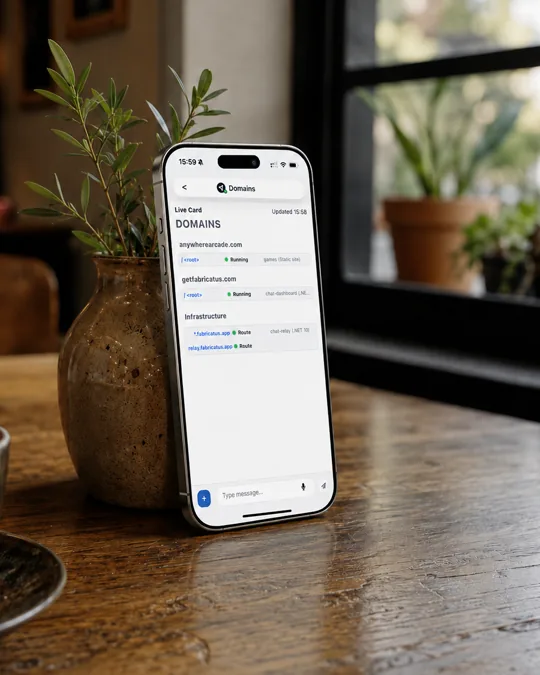
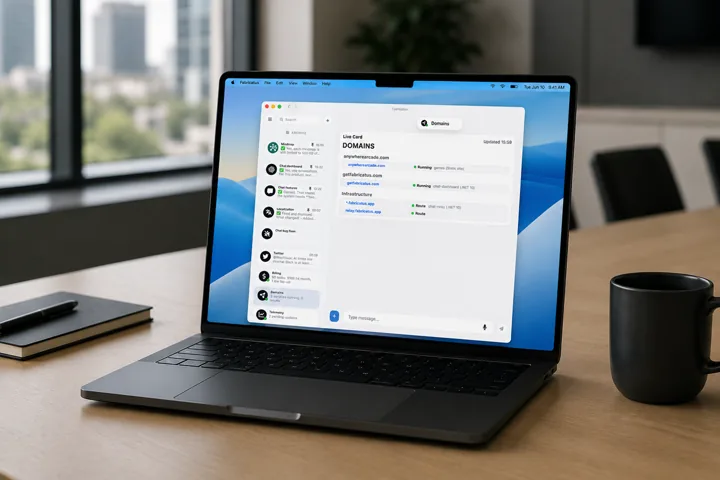
Whether you are prototyping, fixing bugs, or deploying a new feature, Fabricatus lets you seamlessly transition work between devices including your phone without losing the thread.
Fabricatus lets you keep multiple agents moving at once with shared project context and server access between them.
Text, voice, screenshots, files, examples, existing repo.
Plan, edit, run checks, use project files.
Ship without separate release handoff.
Status, dependencies, maintenance, alerts.
You can keep separate threads for ideas, fixes, launch tasks, and follow-up work.
Start on desktop, continue from phone.
You are not trapped inside a black-box builder.
Fabricatus helps with the boring path from app idea to live website.
Track issues, updates, and maintenance instead of forgetting about them.
Connect the subscriptions and providers you already use.
Whether you have rough ideas, an existing business workflow, or some code, Fabricatus keeps the next step in the same workspace.
Start small and iterate quickly with every change as a new live version.
Use plain-language to make quick changes as feedback comes in to iterate your software to perfection.
Describe the spreadsheet, form, report, booking flow, approval step, or customer request.
Share screenshots or voice notes instead of a formal spec. Make ongoing edits as the workflow changes.
Fabricatus helps you ship like a small software team without giving up control.
All the tools you want to use. One agent workspace. No lock-in.
Choose managed convenience with included AI usage, or self-hosted control with your own server and AI tools.
Fabricatus hosts the workspace and includes monthly AI usage for agent work.
For one active builder who wants hosted Fabricatus and a modest included AI budget.
For steady product work with more parallel agent capacity and included AI usage.
For heavier workloads that need more simultaneous tasks, resources, and support depth.
Concurrent agents are the number of agent workstreams that can actively work at once. You can still send more instructions in parallel, they will just queue and work according to your plan limits.
Custom AI agents not affected by concurrent limits.*Upgradable on request
Managed plans include monthly AI usage for agent work. Usage depends on the model and task complexity.
When included usage runs out, upgrade, wait for a limit reset, or connect your own provider/API key.
Connect your own AI subscriptions, provider keys, or compatible endpoints when you want more control over models, limits, or cost. Currently supporting Codex and Copilot natively, plus any OpenAI-compatible endpoint.
Custom AI agents not affected by concurrent limits.
Workspace users include the owner and invited members. All members share the owner’s active subscription.*More seats available on request
Create and keep as many apps, websites, and tools as your workspace can comfortably handle. No artificial limits.
Deploy new versions whenever your agents finish changes, without counting releases. No artificial limits.
Storage is the managed server disk capacity after the server OS and platform services.*Customizable on request
Access the server environment when you need direct control over files, settings, logs, or deployment details. No lock-in. Ever.
Fabricatus does not meter regular app visits or workspace traffic against a plan limit. Subject to abuse guardrails.
Public bandwidth is available for apps and sites served from the managed environment.
Get started right away and deploy as many apps as you want to your included free subdomain.
Bring your own domains is supported. Setup, certificates and email configuration is on you.Turnkey email solution not supported for bring your own domains.
Turnkey setup includes domain routing and email configuration for the included count on each plan. Turnkey setup requires you to purchase domains through us. Domains can also be transferred upon request.*Upgradable on request
Managed email sending includes 1,000 accepted recipients per month and is only available for domains purchased through Fabricatus.*Additional accepted recipients are billed at $1 per started 1,000-recipient overage unit through pay as you grow.
Inbound email includes catch-all routing and hosted inbox storage for domains purchased through Fabricatus.
You do not have to worry about auth plumbing. Fabricatus supports password prompts for managed apps.
Email-based magic links are available on all managed plans. The first 100 magic-link emails per month are included; additional sends are billed like email sends in 1,000-email increments.
Use a custom auth flow when your app needs different sign-in rules or account behavior.
Daily backups are retained on a rolling 7 day window for recovery from accidental changes.
Managed workspaces receive regular Fabricatus updates while the plan is active.
Support depth increases by plan, from limited help on Basic to priority support on Max.
Get early access to new Fabricatus features and newly supported models.
Add domains, email, and launch services when your project is ready to go live.
Find and buy a domain through Fabricatus. We connect DNS, hosting, SSL, and email setup so your app can go live without manual configuration.
Email sending includes 1,000 accepted recipients per month. Additional email sends are billed at $1 per started 1,000-recipient overage unit. Inbox storage is included by plan.
Email sending and inbox hosting are only available for domains purchased through Fabricatus. Magic-link email is available on all managed plans.
Own the software. Run Fabricatus on your own server with your own AI tools.
Self-hosted does not include managed AI usage. Bring your own AI subscriptions, provider keys, or compatible endpoints.
Use your own AI keys and tools, including custom AI agents you wire into your self-hosted environment.
Fabricatus does not set an app count limit on self-hosted installs. Practical limits depend on your own server. No artificial limits.
Fabricatus does not set a deployment count limit on self-hosted installs. Practical limits depend on your own server. No artificial limits.
You control the server, files, environment, routing, and deployment details. No lock-in. Ever.
Storage capacity comes from the VPS or server you provide.
Traffic limits and bandwidth policies come from your VPS, server, or hosting provider.
Public bandwidth depends on the network capacity and limits of the server you provide.
Bring your own domains without Fabricatus plan restrictions.
Fabricatus managed domains and email are only available on managed servers.
Email sending depends on the email service you connect to your self-hosted setup.
Email receiving and forwarding depend on the email service you connect to your self-hosted setup.
Fabricatus managed auth is only available on managed servers.
Fabricatus managed auth is only available on managed servers.
Use your own custom auth stack or integrate an external auth provider on your server.
You manage backup scheduling, retention, storage location, and restore process on your own infrastructure.
Self-hosted licenses include Fabricatus updates while the license is active.
Support is available while your self-hosted license is active.
Manage your subscription and install your agent.
Review your selection and continue to Paddle's secure checkout.
We’ll take you to your dashboard as soon as everything is ready.
Get more included AI usage, parallel agents, and support.
Compare the lower plans, then review the effective date and final details in Paddle.
Install and remove chat plugins for your agents.
Review authentication, passkeys, and active dashboard and chat logins.
Looks like this idea never made it to production.
No page was deployed at this address.
Fabricatus helps you go from first prompt to live software without stitching together chat, code, servers, and deploy tools.